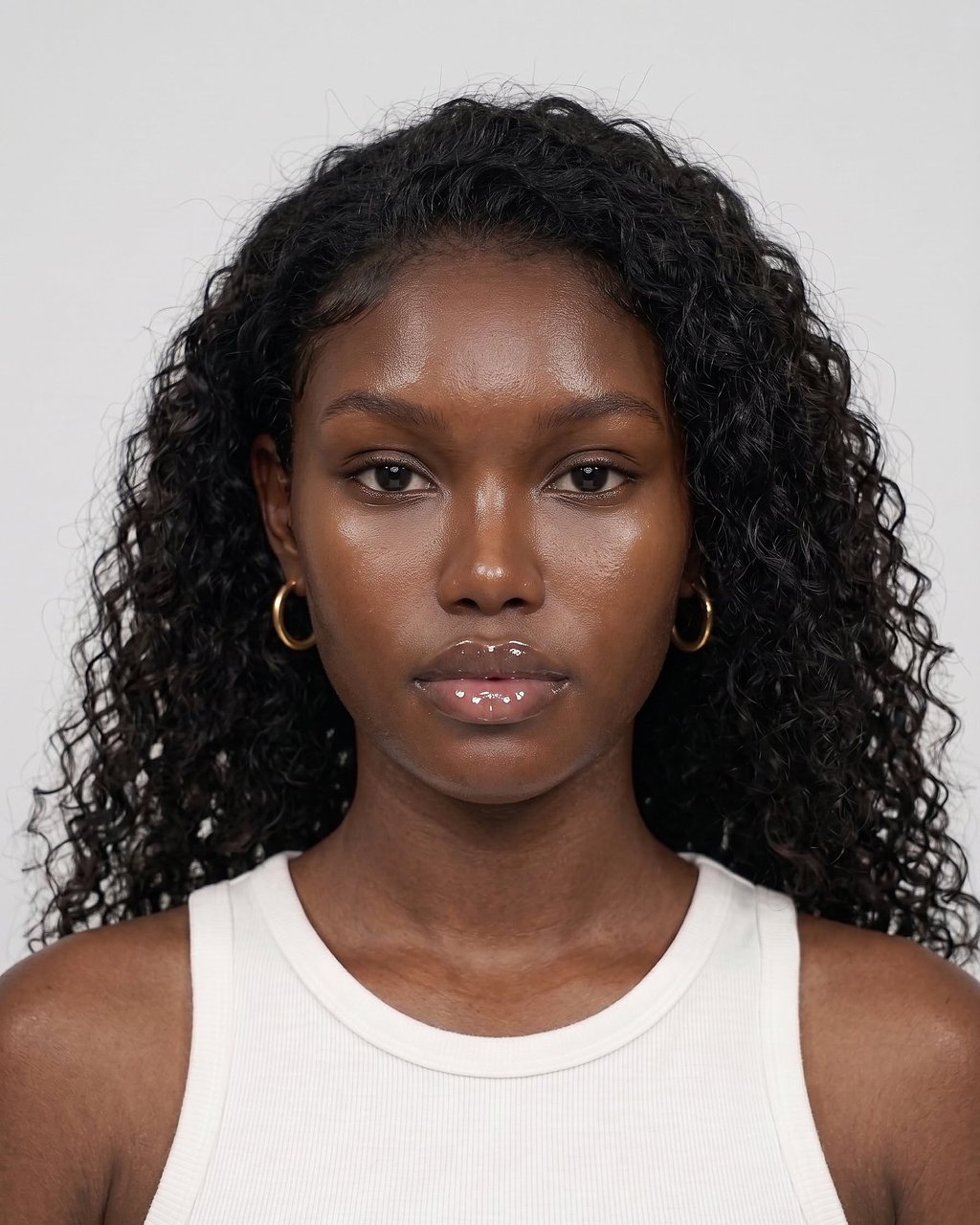
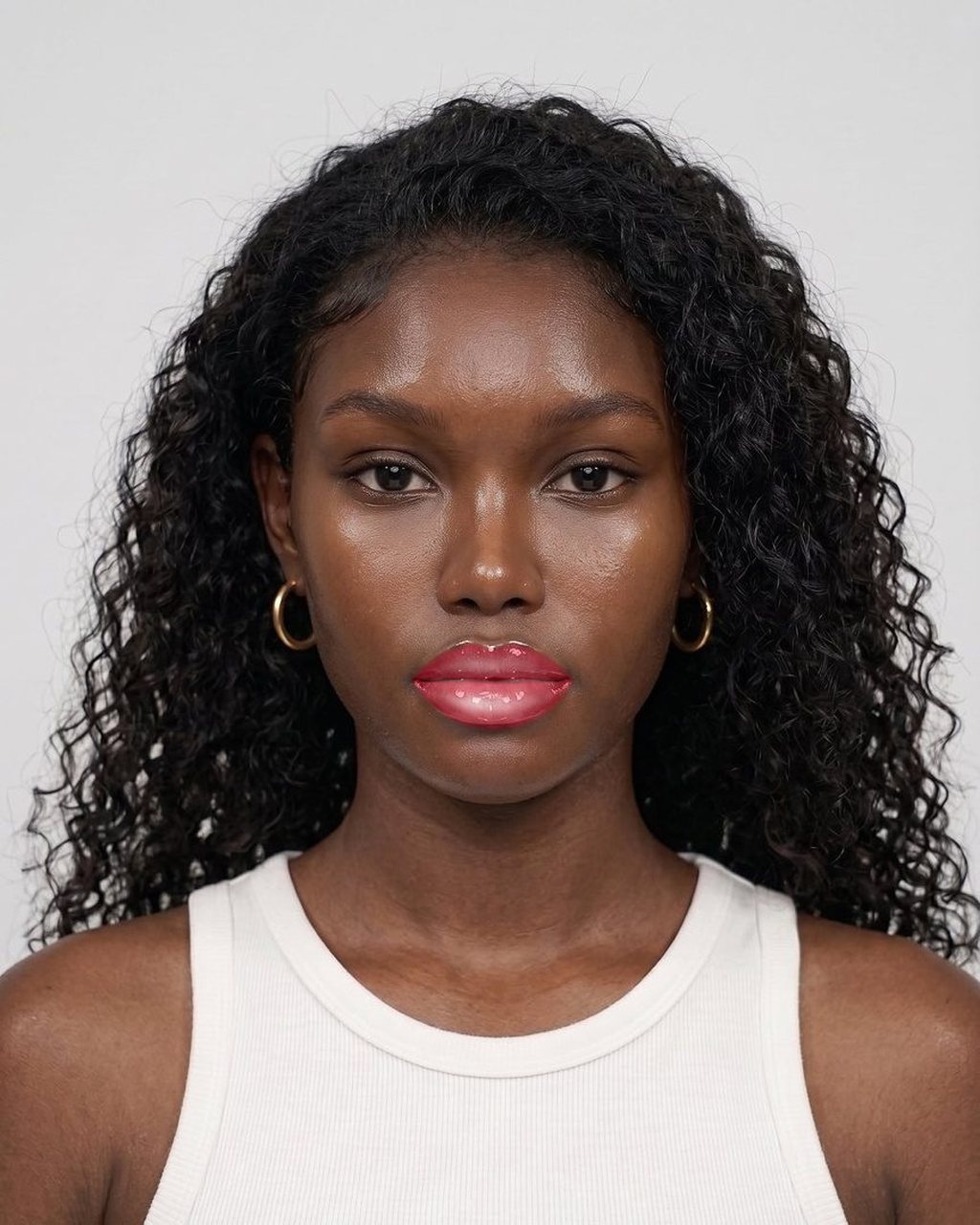
MaIA Try-On · photo-based virtual makeup try-on
Virtual makeup try-on for beauty brands: the customer sends a photo, the product comes back applied
MaIA Try-On is B4A's virtual makeup try-on: an in-house model that takes the customer's photo and returns the same photo with the lipstick — and other makeup categories — applied, in 2 to 4 seconds. It runs through an API in any channel that can carry an image: product page, quiz, WhatsApp, e-mail or in-store kiosk. The photo API needs no SDK and no app. Live camera mode is a separate browser SDK, in early access.
The site demo uses sample colours for the thirteen products and two complete looks. In your project, the palette is your products'.
- 2–4 sper render, from one front-facing photo
- 13 + 1simulators and the Full Look in the demo — sample colours, finishes per product
- Creditsper operation; failures are refunded
- 0 photosstored: the image lives only for the duration of the request
Thirteen simulators and a Full Look
- Lipstick
- Foundation
- Blush
- Face powder
- Concealer
- Eyeshadow
- Mascara
- Eyebrows
- Eyeliner
- Bronzer
- Contour
- Highlighter
- Lip liner
- Full Look
All thirteen simulators and the Full Look right here: in the example, live through the camera and on your own photo. Through the API and the SDK, free colours in #RRGGBB, intensity and finishes per product.
Try our virtual try-on — thirteen products and the Full Look
Pick the product, colour and finish — or one of the complete looks — and drag to compare. Everything rendered by our model on the same photo. In your project, the colours are your products'.
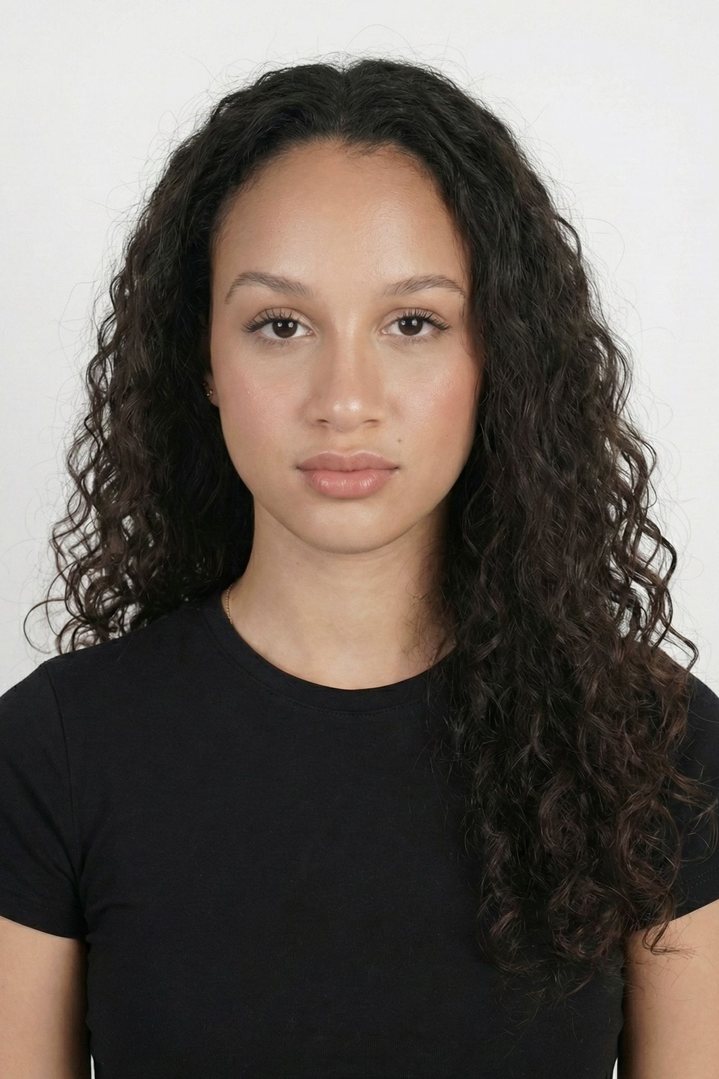
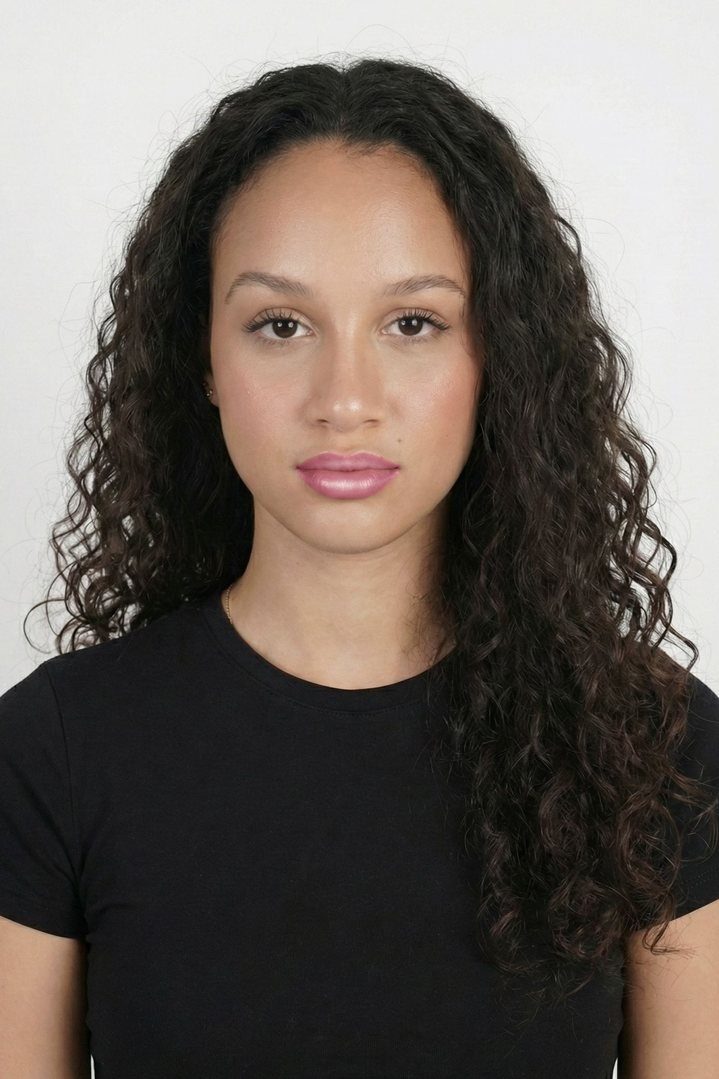
Product · Lipstick
Colour · Rose
Finish
Simulated color may differ from the actual product.
Try it live through the camera — any product or the Full Look
Turn the camera on, pick the product, colour and finish — or a complete look — and see the result frame by frame, with the before/after divider. The preview runs in your browser.
The camera only starts when you click. The image never leaves the device.
Product · Lipstick
Colour · Rose
Finish
Demo colours, not calibrated shades. In your project: your products' palette and finishes.
What a photo-based virtual makeup try-on is
A virtual makeup try-on shows a shopper how a product looks on her own face before she buys. In MaIA Try-On that happens from a single photo: the customer sends a front-facing image, the model locates the makeup area and renders the product with the right colour, coverage and finish. Everything that is not makeup — teeth, mouth, skin, facial features — stays exactly as it was. No skin smoothing, no reshaping, no filter.
The site demo shows the thirteen simulators and the Full Look: lipstick in the six launch shades (rose, classic red, berry, coral, plum and rose nude, in matte, satin and gloss) and, for foundation, concealer, powder, bronzer, contour, blush, highlighter, eyeshadow, eyeliner, mascara, eyebrows and lip liner, sample colours with each product's finishes. The same technology is delivered per project with the palette calibrated to your brand's real products. The demo colours are examples, not a brand's catalogue.
The model is B4A's own — trained in-house, with no third-party try-on vendor — on the same beauty foundation that powers MaIA Scan: hundreds of thousands of real selfies from Brazilian consumers, across the full range of Brazilian skin tones. In a try-on that is decisive: the same lipstick has to look true on fair, medium, dark and deep skin.
How it works, in four steps
From photo to result the call is synchronous: the response to the request is the finished image.
The customer sends a front-facing photo
JPEG or PNG up to 6 MB, shorter side at least 320 px, mouth visible. It can come from an upload, the phone camera or a WhatsApp message. The brand collects the person's consent before sending.
Your application picks shade and finish
One multipart POST /api/v1/try-on with the photo, the shade and the finish (matte, satin or gloss). The accepted shades come from GET /api/v1/try-on/shades, at no credit cost.
The model renders only the makeup area
In 2 to 4 seconds the photo comes back as a PNG with the product applied. The X-TryOn-Finish-Requested and X-TryOn-Finish-Applied headers tell you which finish you asked for and which one could be applied to that photo.
You show the result where the sale happens
On the product page, in the quiz, in the WhatsApp conversation or in an e-mail. The image belongs to the customer: she can save it, compare shades and head to the cart with the right colour.
Who it is for: where a lipstick try-on sells most
Because it starts from a photo rather than a live camera, MaIA Try-On fits channels an augmented-reality mirror cannot enter.
Product page (PDP)
A "See it on me" button next to the shade selector. The customer uploads one selfie and switches shades without re-uploading; "is this red for me?" gets answered on the PDP itself.
The brand's WhatsApp
The customer sends a selfie in the conversation and receives her photo with the lipstick applied — plus the product link. It is the same channel where MaIA Beauty Advisor recommends and sells.
Beauty quiz and lead capture
At the end of the quiz, instead of a list, the person sees her own photo wearing the recommended shade. More memorable, more shareable, and a concrete reason to leave an e-mail address.
Retail and kiosks
A screen with a camera takes the photo and shows the try-on in seconds, with no app and no camera permission on the customer's phone. Useful for lines with dozens of shades.
Live through the camera: the MaIA Try-On SDK in early access
Beyond the photo API, MaIA Try-On exists as a browser SDK, in early access since September 2026: thirteen simulators and a Full Look, rendered locally on the customer's device — live through the camera or from a photo — without sending the image to any server.
Thirteen products and a Full Look
Lipstick, foundation, blush, face powder, concealer, eyeshadow, mascara, eyebrows, eyeliner, bronzer, contour, highlighter and lip liner, with free #RRGGBB colours, intensity and per-product finishes. Full Look combines the layers in a fixed order.
Live or photo, on the device
Live mode through the camera (the person clicks to turn it on) or photo mode, with a before/after divider. Nothing is uploaded: the preview runs in the browser. Any of the thirteen products and the Full Look can get a final render on the server, through the API, charged in credits.
Hosted by you, versioned
An immutable bundle your brand hosts on its own origin, with an integration guide (JavaScript, React and Angular), CSP and privacy requirements and per-version rollback. Enabled account by account by B4A; physical-device acceptance stays with engineering.
The SDK is in early access: create your account and ask for access. The integration guide lives in the signed-in area.
Create an account and request SDK access →Why virtual try-on converts: what brands have already measured
The numbers below come from third parties — brands and vendors with technologies and contexts different from MaIA Try-On. A market reference, not a promise.
Up to 10× the average conversion
At The Estée Lauder Companies, virtual services — virtual try-on and online consultations — convert at up to 10 times the average, with a higher average order value (Fabrizio Freda, CEO, earnings call, Nov 2020).
2.5× higher sales conversion
Brands reported a 2.5 times increase in sales conversion after implementing virtual try-on (Perfect Corp AI trends report, as reported by Retail Dive, Sep 2024).
100 million sessions in one year
L'Oréal logged over 100 million virtual try-on sessions in 2023, up from 40 million in 2022 (Nicolas Hieronimus, CEO, annual results, Feb 2024).
What they have in common: virtual try-on removes the "is this shade for me?" doubt from the path to purchase — exactly where MaIA Try-On comes in, on the product page, in the quiz and on WhatsApp, from a single photo.
Your conversion depends on your catalog, your traffic and where the try-on enters the journey. We measure it in your project.
Virtual try-on vs AR try-on: what's the difference?
When someone searches for "AR try-on" or "virtual mirror" they usually picture a live camera tracking the face in real time. MaIA Try-On is not that — and it is worth saying plainly. It is a photo-based virtual try-on: a still image goes in, a rendered image comes out. The two approaches solve different problems.
Live augmented reality needs an SDK on the site or in the app, WebGL or native code, camera permission and a good connection; it shines in store mirrors and in-app experiences. A photo-based try-on only needs an image to exist — which is why it works in WhatsApp, e-mail, the PDP and the quiz with no special front-end integration, produces a file the customer keeps and shares, and lets each shade be calibrated to the brand's real product with far more control over the result.
| MaIA Try-On (photo-based) | AR try-on (live camera) | |
|---|---|---|
| Input | One front-facing photo (upload, camera or message) | Real-time camera video |
| Where it works | Any channel that carries an image: PDP, quiz, WhatsApp, e-mail, kiosk | Site or app with an SDK, WebGL and camera permission |
| Integration | One HTTP call; no SDK, no app | Front-end SDK, often one per platform |
| Response time | 2 to 4 seconds per render | Instant, frame by frame |
| Output | A PNG the customer saves and shares | A live experience, no file by default |
| Colour calibration | Per product, as a project, with human validation | Depends on the AR engine and the camera lighting |
| Best for | E-commerce, conversation, quizzes, e-mail | Store mirrors, in-app experiences |
What the try-on API takes and returns
The MaIA API is an HTTPS gateway: you authenticate with a key from your account (Authorization: Bearer msk_live_…), send multipart/form-data and get the answer in the same request. No webhook, no queue, no session state.
photo · shade · finishRequest
A JPEG or PNG photo (we check the bytes, not the Content-Type), the shade id and the finish. An optional x-request-id is stored on the usage event for reconciliation.
image/pngResponse
The rendered photo as PNG with Cache-Control: no-store. The receipt travels in the headers X-Session-Id, X-Credits-Remaining, X-TryOn-Finish-Requested and X-TryOn-Finish-Applied — if the requested finish cannot be applied to that photo, the model uses the shade's trained finish and tells you.
GET /api/v1/try-on/shadesShades and finishes
Lists the accepted ids, each shade's reference hex, its trained finish and the upload limit. Costs no credit.
422 · 413 · 503Errors that cost nothing
bad_photo (face not frontal, mouth not visible, photo too small), photo_too_large, invalid_selection or upstream_unavailable: in every case the reserved credit is released.
credits per operationCredits
The same credits pay for the try-on — any of the thirteen products, in a demo shade or in your product's #RRGGBB colour, and the Full Look — and for MaIA Scan. Each operation consumes credits from the balance; failures are refunded. The current price list and the full PDF documentation live in the account area.
Simulated colour may differ from the actual product. Photos larger than 1600 × 1079 px may be downscaled by the model before rendering; the render service scales to zero, so the first call after an idle period can take longer.
Read the full technical documentation →Create your login to download the documentationYour brand's palette, not ours
A try-on only sells if the colour on screen matches the product in the box. That is why MaIA Try-On is calibrated per brand: we take your product references — swatches, application photos, each shade's spec — and tune colour, coverage and finish until the render matches the real lipstick across a range of skin tones, with human validation before it enters your project. The same goes for makeup categories beyond lipstick; the project scope defines which lines and how many shades are included, in which channels the try-on appears and how the result connects to your catalogue — for instance an "add to cart" that already carries the shade the customer just tried.
Privacy: nobody keeps the photo
The customer's photo lives in memory only for the duration of the request and is forwarded once to the model. The gateway never writes photos to disk, database or logs — logs record size, shade, finish, latency and status. The render service does not keep the image either: only the PNG comes back to you, with Cache-Control: no-store. There is no facial recognition, no identification of people and no inference of protected traits.
Integration: start today via API or have it delivered as a project
Both paths use the same model. The difference is who builds the experience and which shades go in.
Self-service
You integrate. Start today.
Create the account, buy a credit package, generate the msk_live_ key and call POST /api/v1/try-on with any of the thirteen products (demo shades or #RRGGBB colours) and the Full Look. Ideal for validating the experience in your front-end before calibrating the palette.
Create account and API keyFull project
B4A calibrates, builds and operates.
Palette calibrated to your products (lipstick and other categories), the try-on integrated where your customer buys — PDP, quiz, WhatsApp or kiosk — and connected to your catalogue. Credits included in the project.
Talk to us about virtual try-onFrequently asked questions
What brands ask about virtual makeup try-on
No. It is a photo-based virtual try-on. The self-service API is photo-based: a still image in, the same image back with the product applied, in 2 to 4 seconds, with no SDK and no app. Live camera is a separate browser SDK in early access, not the core product.
The demo shows the thirteen simulators and the Full Look with sample colours: lipstick in the six launch shades and three finishes (matte, satin and gloss), and the other products with demo colours and each one's finishes. For your brand we calibrate the palette and finishes of your real products, per project.
No. Only the makeup area is rendered. Teeth, mouth, skin and features stay as in the original photo; there is no skin smoothing, reshaping or filter. Simulated colour may differ from the actual product, and we say so in the interface.
No. The photo stays in memory only during the request and is discarded right after — neither the gateway nor the render service keeps it. Only the rendered PNG comes back to you, with Cache-Control: no-store.
Every render — any simulator or the Full Look — consumes credits from your account balance, the same credits as MaIA Scan. Packages start at R$ 998 for 500 credits, with no subscription and no expiry; the per-operation price list lives in the account area. If the model refuses the photo (422 bad_photo) or is unavailable (503), the reserved credit is released automatically.
No. It is one multipart HTTP call to POST /api/v1/try-on with the photo, shade and finish; the response is the PNG image. Any stack that can send multipart works — the documentation has samples in curl, Node.js and Python.
Put your brand's lipstick on the customer's photo.
Try the demo with your own photo, create an account to integrate today — or talk to us about calibrating your product palette.